Do the iPhone XR and XS support eSIM?
Apple iPhone XS / XS Max / XR · Updated Aug 18, 2026 · 5 min read

Yes. Apple's requirement for running an eSIM starts at exactly this generation, so the XR, XS and XS Max all take one alongside the nano-SIM already in the tray. The catch is regional: units sold in a few markets ship with two physical SIM slots and no eSIM at all.
This generation is where eSIM begins on iPhone. Apple's stated requirement for Dual SIM with an eSIM is an iPhone XS, iPhone XS Max, iPhone XR, or later, which means a phone from 2018 still takes a travel plan today. It also keeps the nano-SIM tray, so nothing has to come out: your home number stays on the plastic SIM while the travel plan arrives as a second line.
Which XR and XS models support eSIM
Almost all of them. The exception is not a model but a market: Apple sells some iPhones in China mainland, Hong Kong and Macao with two physical SIM slots instead of an eSIM, and no setting turns that into eSIM support.
| Which one you have | eSIM | Physical SIM tray |
|---|---|---|
| iPhone XR, bought in most countries | Yes | Nano-SIM as well |
| iPhone XS or XS Max, bought in most countries | Yes | Nano-SIM as well |
| Bought in China mainland | No | Two nano-SIM slots |
If you are not sure what your phone supports before you buy anything, the compatibility checklist walks through the checks in order, and it applies to every brand rather than just this one.
The regional exception that catches people out
Apple lists the SIM type for every model it has sold, and this generation sits in the eSIM and nano-SIM group in its own support table. Two markets break that pattern. In China mainland, only the very newest iPhones support eSIM at all, so an XR or XS bought there has none. In Hong Kong and Macao, several models ship with Dual SIM using two nano-SIM cards instead, and Apple's list of eSIM-capable phones for those markets names the iPhone XS but not the XR or the XS Max.
How to add a travel eSIM to an iPhone XR or XS
The install is a scan, not a purchase step, so do it at home on Wi-Fi before you fly. Nothing starts counting down until the eSIM connects to a network at your destination.
- Open Settings, then Cellular, then Add eSIM.
- Choose Use QR Code and scan the code from your order email.
- Give the line a label you will recognise later, for example Zwitchy Travel.
- Leave it switched off until you land, then turn the line on.
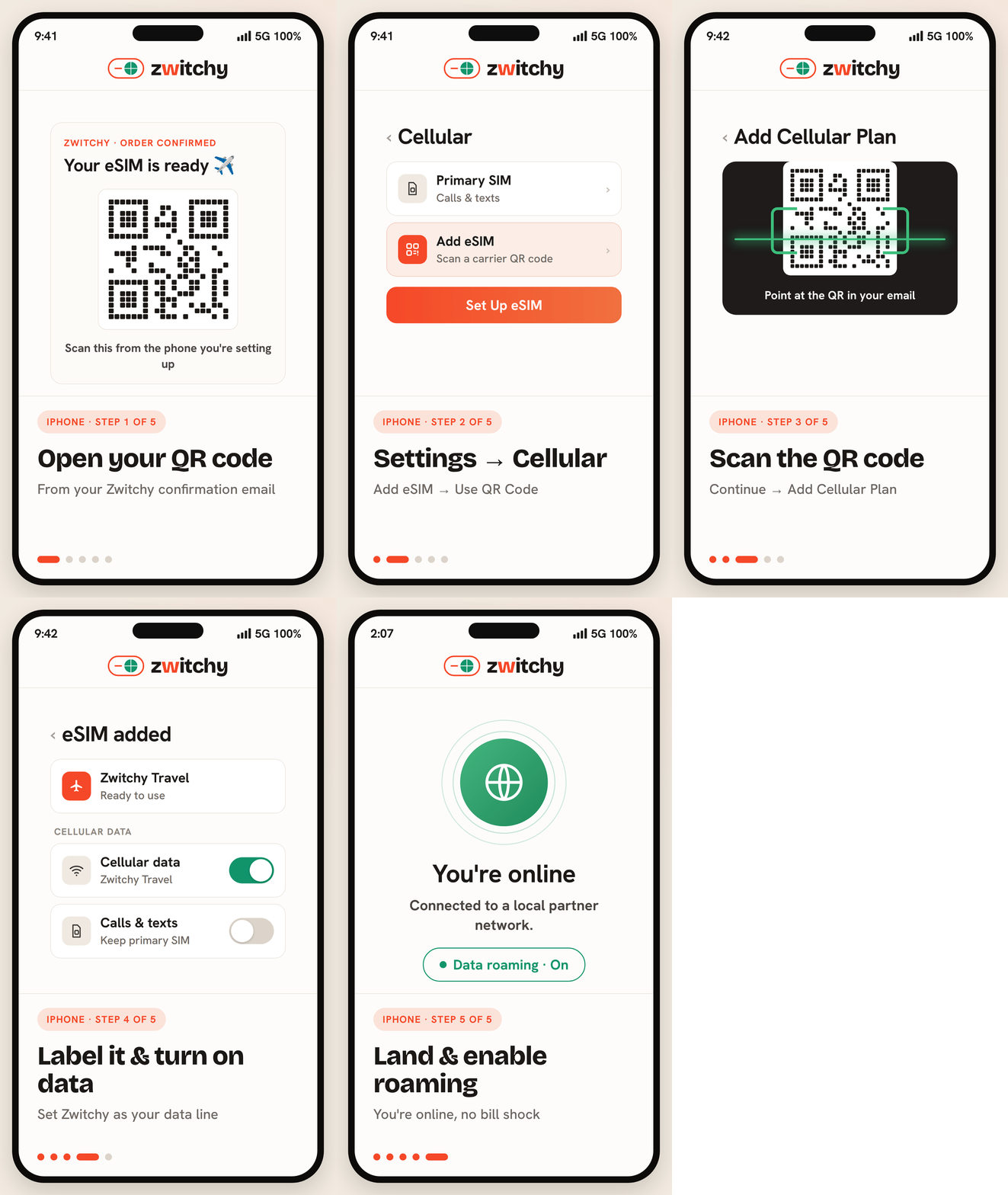
A phone this age may be several iOS versions behind, and the wording on that screen has changed over the years. If you do not see Add eSIM, look for the option to add a cellular or mobile plan in the same place. Failing that, the same plan installs by typing the details in by hand: manual activation lists the exact fields, and eSIM QR code not scanning covers the rest.
The two settings that decide whether data works
Almost every iPhone that installs an eSIM successfully but shows no data is one of these two settings, not a broken plan. Set Cellular Data to your travel line, and turn Data Roaming on for that line only.
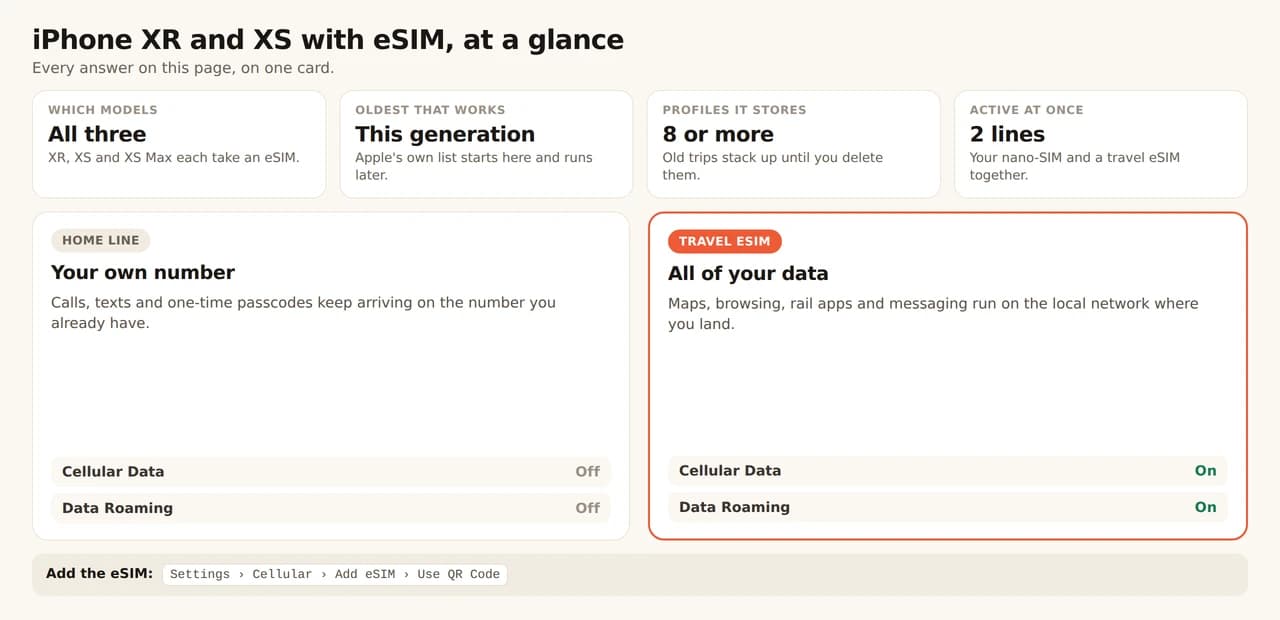
Both screens, in order, are in our dual-SIM line settings guide, and the reasoning behind the roaming switch is in Data Roaming ON: why it is correct.
How many eSIMs an iPhone XR or XS holds
An eSIM-capable iPhone stores 8 or more eSIM profiles and runs one of them alongside your nano-SIM. That is all a trip needs: your home number stays reachable for calls and one-time passcodes while the travel eSIM carries data. If an install stalls because the phone is full, how many eSIMs your phone can hold explains what is safe to delete first.
Check it is not carrier-locked
A phone this age has often been through a contract, and a carrier lock survives the contract ending unless somebody asks for it to be removed. Open Settings, then General, then About, and look for Carrier Lock. No SIM restrictions is what you want to see. Anything else means your carrier still has to unlock it, which is a call to make before you fly, not from the airport.
Using an older iPhone across Europe
Age makes no difference to coverage. The travel eSIM connects to the same local networks a new handset would, and one regional plan stays your data line from the first border to the last. If your route crosses several countries, our Europe plans cover them on a single eSIM, and two weeks in Europe by train works through a five-country route leg by leg.
Is the iPhone XR too old for a travel eSIM?
No. Apple's own requirement for eSIM starts at the XS, XS Max and XR, so this generation is the oldest that works rather than the first that does not.
Do I have to remove my nano-SIM?
No. These models keep the tray and run one eSIM alongside it, which is exactly how a travel plan is meant to work: home number for calls, travel line for data.
Why does my XR have two SIM slots and no eSIM?
It was almost certainly sold in China mainland, Hong Kong or Macao, where Apple ships some models with two nano-SIM slots instead of an eSIM. The hardware cannot be changed by a setting or an update.
Will an older iOS version stop the eSIM working?
The feature has been supported since this generation launched, though the menu wording has changed over the years. If you cannot find Add eSIM, look for the option to add a cellular plan in the same screen.
Will I lose my phone number?
No. A travel eSIM is data-only and runs as a second line, so your home number stays active on the same phone for calls, texts and one-time passcodes.