Do the Galaxy S24, S23 and S22 support eSIM?
Samsung Galaxy S24 / S23 / S22 · Updated Aug 18, 2026 · 5 min read

Yes. Samsung lists the S24, S23 and S22 ranges, Plus and Ultra included, as eSIM devices, and each runs an eSIM alongside its nano-SIM. One caveat is worth checking before you buy a plan: Samsung says the country a handset was made for can still leave eSIM unsupported.
These three generations are the safe middle of Samsung's range for travel. All of them appear on Samsung's own list of Galaxy devices that support eSIM, and all of them keep a physical tray, so a travel plan arrives as a second line rather than replacing the number you already use.
Which Galaxy models support eSIM
Every S24, S23 and S22, including the Plus and Ultra variants. Samsung describes these as hybrid eSIM devices, meaning one eSIM plus one nano-SIM rather than two physical slots.
| Galaxy model | eSIM | Physical SIM tray |
|---|---|---|
| Galaxy S24, S24+, S24 Ultra | Yes | Nano-SIM as well |
| Galaxy S23, S23+, S23 Ultra | Yes | Nano-SIM as well |
| Galaxy S22, S22+, S22 Ultra | Yes | Nano-SIM as well |
For the general checks rather than this one range, the compatibility checklist walks through them in order for every brand.
The caveat Samsung puts on its own list
Samsung is unusually direct about this. Underneath the list of supported devices it warns that, depending on the country a device was made for, eSIM may not be supported even when the model is named, and asks you to check your specific handset. Unlike Apple, Samsung does not publish a tidy per-market table, so the reliable check is the phone itself rather than the model number.
How to add a travel eSIM to a Galaxy
The install is a scan, not a purchase step, so do it at home on Wi-Fi before you fly. Nothing starts counting down until the eSIM connects to a network at your destination.
- Open Settings, then Connections, then SIM manager.
- Tap Add eSIM, then choose to scan a QR code.
- Scan the code from your order email and let the profile download.
- Name the line so you recognise it later, for example Zwitchy Travel.
- Leave it switched off until you land, then turn the line on.
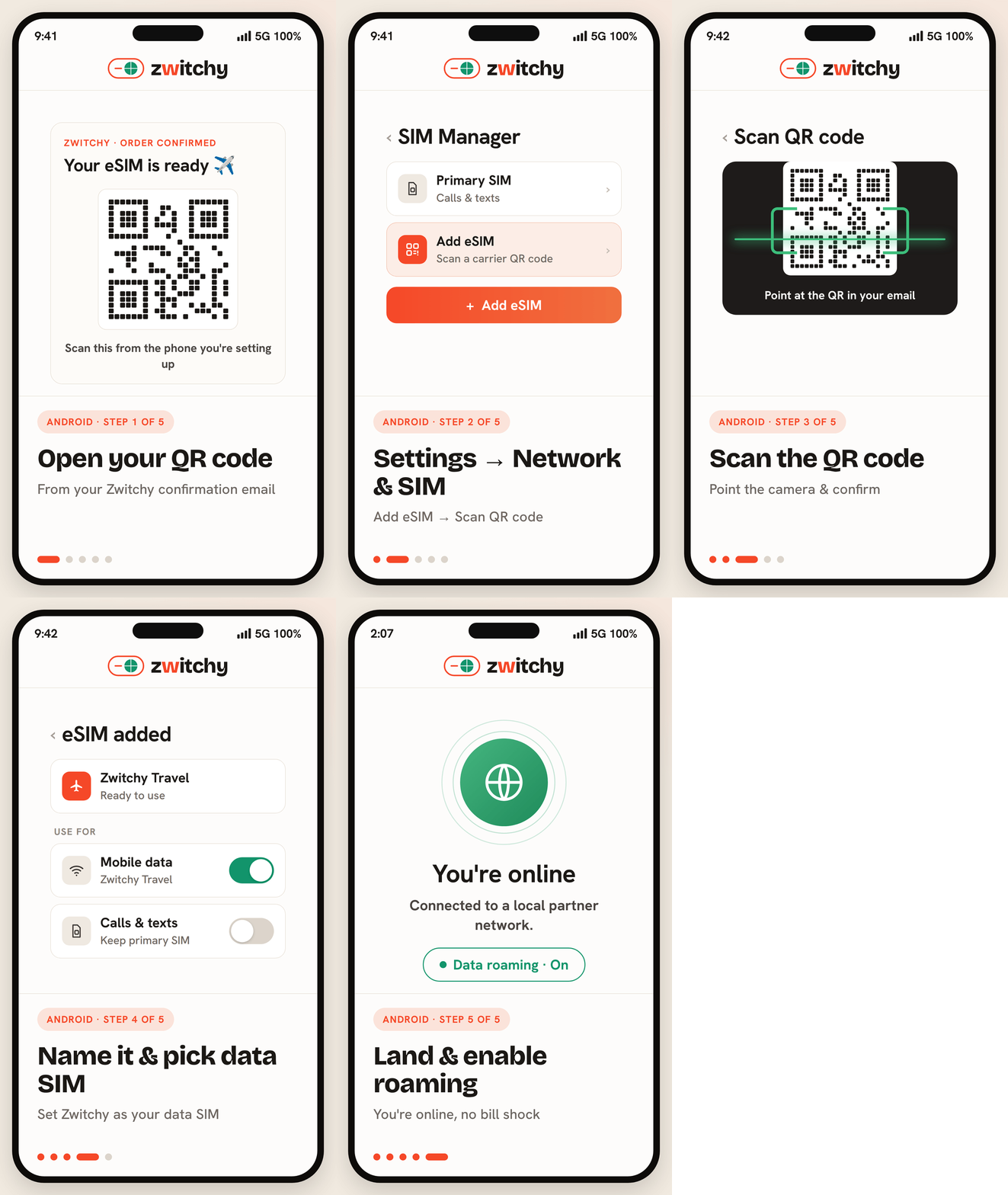
Samsung also supports adding a plan without a QR code, by entering an activation code by hand. Manual activation lists the exact fields, and eSIM QR code not scanning covers the rest.
The two settings that decide whether data works
Almost every Galaxy that installs an eSIM successfully but shows no data is one of these two settings, not a broken plan. Set mobile data to the travel line, and turn data roaming on for that line only.
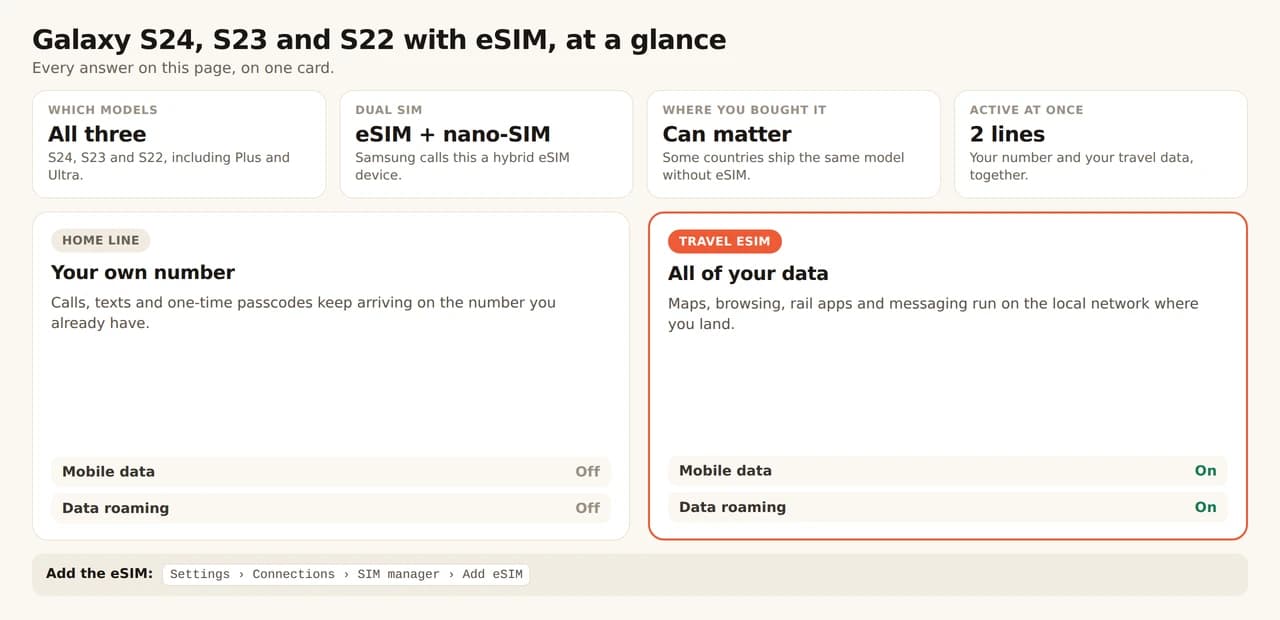
Both screens, in order, are in our dual-SIM line settings guide, and the reasoning behind the roaming switch is in Data Roaming ON: why it is correct.
How many eSIMs a Galaxy holds
Samsung does not publish one number the way Apple does, and in practice it varies by model and software version, so treat the storage limit as something to check on your own phone rather than a spec to rely on. What matters for a trip is simpler: one travel eSIM active alongside your usual SIM. If an install stalls because the phone is full, how many eSIMs your phone can hold explains what is safe to delete first.
Check it is not carrier-locked
eSIM support and a carrier lock are different things, and a locked Galaxy will refuse a travel plan even though the hardware is fine. A phone bought outright is usually unlocked; one that came with a contract often is not until you ask. Sorting that out is a call to make before you fly, not from the airport.
Using a Galaxy across Europe
Because the phone runs two lines at once, a multi-country trip needs no swapping at all: one regional plan stays your data line from the first border to the last. If your route crosses several countries, our Europe plans cover them on a single eSIM, and two weeks in Europe by train works through a five-country route leg by leg with the data each one actually needs.
Does the Galaxy S22 still support eSIM?
Yes. Samsung lists the S22, S22+ and S22 Ultra alongside the newer ranges, and the setup path is identical to the S24.
Why can I not find Add eSIM on my Galaxy?
Most often the handset was made for a market where Samsung does not enable eSIM. Samsung warns about this on its own support page, and no update or setting adds the feature afterwards.
Do I have to remove my SIM card?
No. These are hybrid eSIM devices, so the travel eSIM runs alongside the nano-SIM: home number for calls and texts, travel line for data.
Can I install the eSIM before I travel?
Yes, and it is the calm way to do it. Installing downloads the profile onto the phone; the plan only starts once the line connects to a network at your destination.
Why is there no data after installing?
Two settings, almost always: mobile data has to point at the travel line, and data roaming has to be on for that line. Check those before assuming the eSIM is faulty.