Does the iPhone 15 support eSIM?
Apple iPhone 15 series · Updated Aug 17, 2026 · 5 min read
Yes. All four iPhone 15 models support eSIM, and US versions ship with no SIM tray, so an eSIM is the only way to add a plan. You can store several profiles and run two lines at once, which is what lets a travel eSIM carry your data while your home number keeps handling calls.
The iPhone 15 was the third iPhone generation to ship eSIM-only in the United States, so if you bought yours there, a travel eSIM is not merely supported: it is the only kind of plan the phone accepts. Bought anywhere else, the same model keeps a nano-SIM tray alongside eSIM and you can run both. Either way, adding a travel plan takes a couple of minutes and no shop visit.
Which iPhone 15 models support eSIM
All of them. There is no iPhone 15 variant without eSIM support, so the only thing that differs between them is whether a physical tray sits alongside it, and that depends on where the phone was sold rather than which model you picked.
| iPhone 15 variant | eSIM | Physical SIM tray |
|---|---|---|
| iPhone 15 and 15 Plus, bought in the US | Yes | No tray |
| iPhone 15 Pro and Pro Max, bought in the US | Yes | No tray |
| Any iPhone 15, bought outside the US | Yes | Nano-SIM tray as well |
Not sure which one you are holding? Look along the edge of the phone. No tray means eSIM-only, and there is no setting that changes it. Our eSIM-only iPhone guide covers what that means for the rest of your trip, including what to do if your home number is still on a plastic SIM.
How to add a travel eSIM to an iPhone 15
The install is a scan, not a purchase step, so do it at home on Wi-Fi before you fly. Nothing starts counting down until the eSIM connects to a network at your destination.
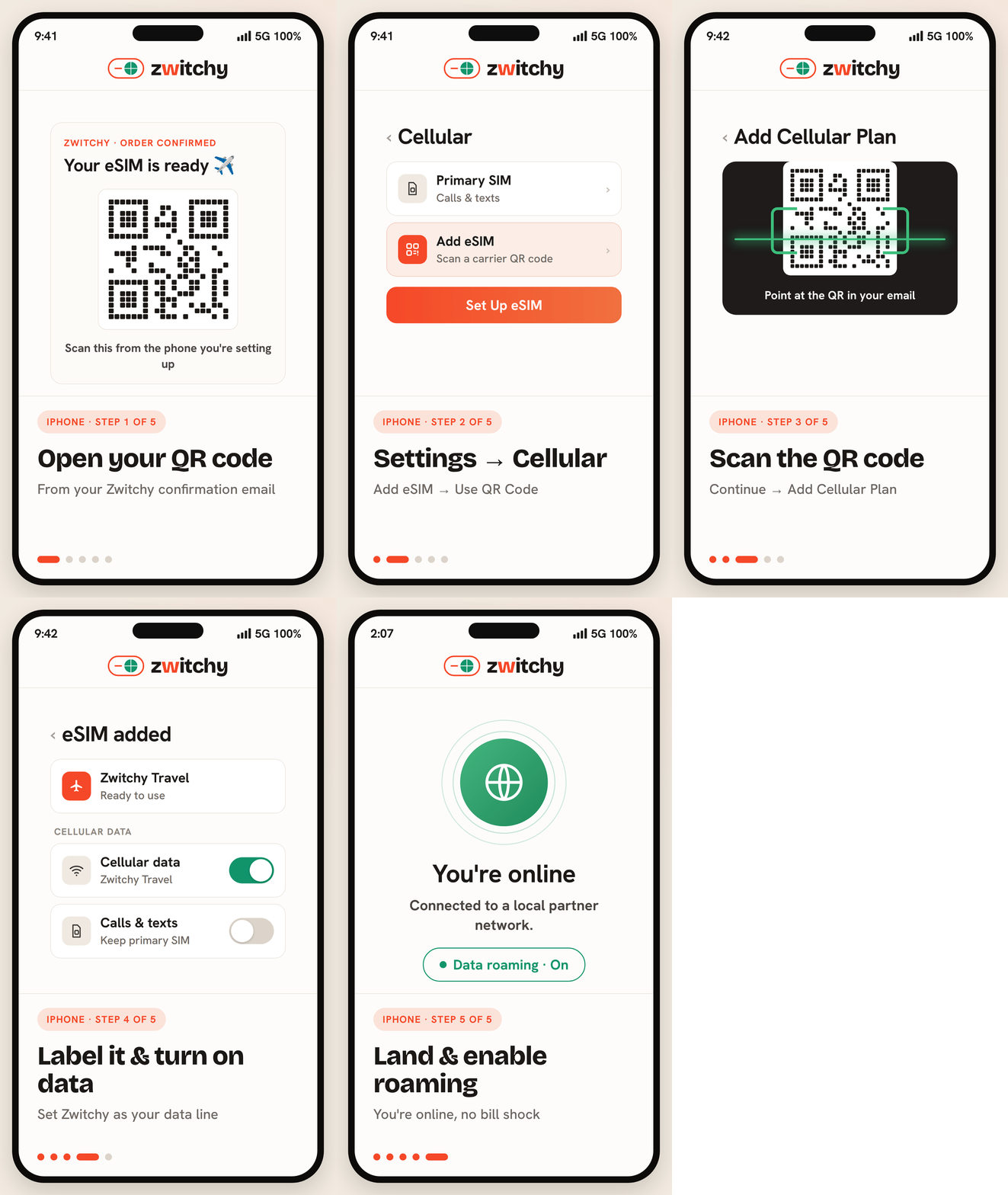
- Open Settings, then Cellular, then Add eSIM.
- Choose Use QR Code and scan the code from your order email.
- Give the line a label you will recognise later, for example Zwitchy Travel.
- Leave it switched off until you land, then turn the line on.
If the camera will not read the code, the same plan installs by typing the details in by hand. Our manual activation guide has the exact fields, and eSIM QR code not scanning covers the rest.
The two settings that decide whether data works
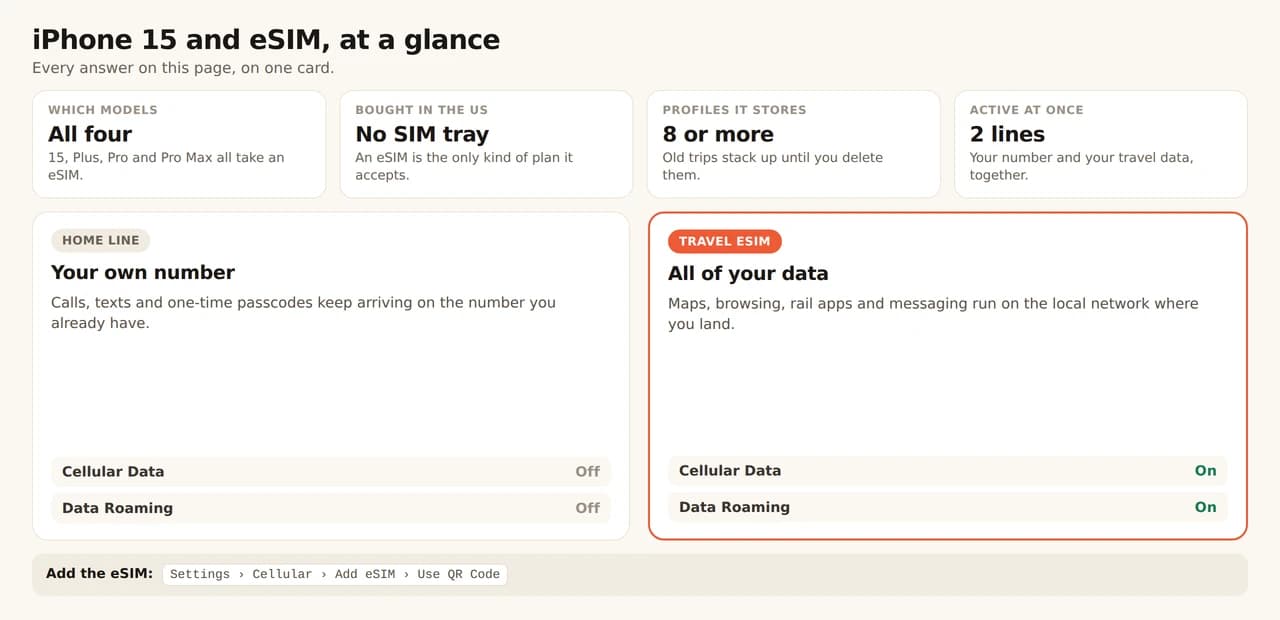
Almost every iPhone 15 that installs an eSIM successfully but shows no data is one of these two settings, not a broken plan. Set Cellular Data to your travel line, and turn Data Roaming on for that line only.
Both screens, in order, are in our dual-SIM line settings guide, and the reasoning behind the roaming switch is in Data Roaming ON: why it is correct.
How many eSIMs an iPhone 15 holds
An eSIM-capable iPhone stores 8 or more eSIM profiles and runs up to two of them at once. That second active line is the whole point for travel: your home number stays reachable for calls and one-time passcodes while the travel eSIM carries data. If an install ever stalls because the phone is full, how many eSIMs your phone can hold explains what is safe to delete first.
Check it is not carrier-locked
eSIM support and a carrier lock are different things, and a locked iPhone 15 will refuse a travel plan even though the hardware is fine. Open Settings, then General, then About, and look for Carrier Lock. No SIM restrictions is what you want to see. Anything else means your carrier still has to unlock it, which is a call you want to make before you fly, not from the airport.
Using an iPhone 15 across Europe
Because the phone runs two lines at once, a multi-country trip needs no swapping at all: one regional plan stays your data line from the first border to the last. If your route crosses several countries, our Europe plans cover them on a single eSIM, and two weeks in Europe by train works through a five-country route leg by leg with the data each one actually needs.
Does the iPhone 15 work with a travel eSIM?
Yes, every model. US iPhone 15 models are eSIM-only, so a travel eSIM is the only kind of plan they take; models sold elsewhere accept one alongside the nano-SIM already in the tray.
Will I lose my phone number?
No. A travel eSIM is data-only and runs as a second line, so your home number stays active on the same phone for calls, texts and one-time passcodes.
Can I install the eSIM before I travel?
Yes, and it is the calm way to do it. Installing loads the profile onto the phone; the plan only starts once the line connects to a network at your destination.
Why does my iPhone 15 show no data after installing?
Two settings, almost always: Cellular Data has to point at the travel line, and Data Roaming has to be on for that line. Check those before assuming the eSIM is faulty.
Do I need to remove my home SIM first?
No. The iPhone 15 keeps two lines active at once, which is exactly how a travel eSIM is meant to run: home line for calls, travel line for data.